🌉 How to Bridge USDC → vUSDC via VentoSwap
You can bridge your USDC from Ethereum into vUSDC on the AO (Arweave) network using VentoSwap's bridge tool. Here's how:
🔎 1. What Is VentoSwap?
VentoSwap offers a bridge that enables users to convert assets—such as USDC and AR—into their corresponding AO-native versions, vUSDC and vAR, respectively.
Although details on the site are limited, the feature is officially confirmed on VentoSwap’s social channels.
🛠 2. Step-by-Step Guide to Bridging
1️⃣ Step 1: Visit the Bridge Interface
Go to the VentoSwap bridge page https://ventoswap.com/.

2️⃣ Step 2: Connect Your Wallet
You will need two wallets for the bridging process:
- 🔑 An Ethereum wallet (such as MetaMask) to send and lock your USDC on Ethereum.
- 💼 An AO wallet (such as Wander Wallet) to receive your bridged tokens (vUSDC) on the AO network.
Connect both wallets to the VentoSwap interface before proceeding.

3️⃣ Step 3: Select Assets
- Choose USDC as the asset you're sending from Ethereum.
- Select vUSDC as the destination version on the AO network.
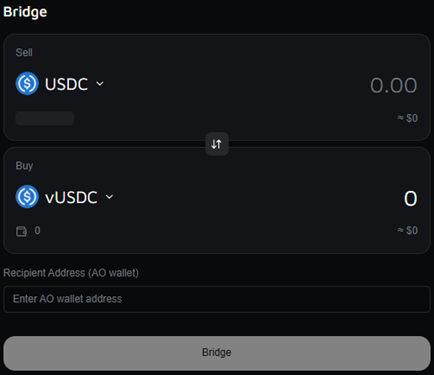
4️⃣ Step 4: Enter Amount and Confirm
Specify how much USDC you'd like to bridge. Double-check estimated fees, network details, and any transaction info.【113†source】
5️⃣ Step 5: Execute and Wait
Approve the transaction in your wallet. Once confirmed, your USDC will be locked on Ethereum, and vUSDC will be minted on the AO network.
6️⃣ Step 6: Receive vUSDC
Following confirmation, the vUSDC should appear in your AO-compatible wallet.
📊 3. Summary Table
| Step | Action |
|---|---|
| 1 | Visit VentoSwap bridge tab |
| 2 | Connect wallet (e.g., MetaMask + Wander) |
| 3 | Select USDC (Ethereum) → vUSDC (AO) |
| 4 | Enter amount and review details |
| 5 | Approve transaction |
| 6 | Receive vUSDC in your AO wallet |
ℹ️ 4. Important Notes
- ✅ Confirmed Functionality: VentoSwap supports converting USDC → vUSDC, as stated on their official channel.
- 🖥 Interface Details Are Limited: The bridge UI may be minimal — don’t worry if transaction history or steps aren’t fully detailed.
- 🔒 Use at Your Own Risk: Always ensure you’re on the correct domain (ventoswap.com) and protect your wallet credentials.
🎯 5. Closing Thoughts
Bridging USDC to vUSDC via VentoSwap is relatively simple:
- Navigate to the bridge tab on VentoSwap.
- Connect your Ethereum-compatible wallet.
- Choose USDC as the source and vUSDC as the destination.
- Enter the amount, approve the transaction, and wait.
- Receive vUSDC in your AO wallet.
This process opens the door to further asset usage within the AO ecosystem. 🚀